Dirt Gear 1.1.1
97/100 out of 100
Windows editor that makes MX Bikes rider-gear paints from creators' PSD templates
An earlier release. The newest card is Dirt Gear 1.2.1.
- Game
- MX Bikes
- Version
- 1.1.1: the GitHub release v1.1.1,
Dirt-Gear-Setup-1.1.1.exe, withupdate.jsonandupdate.json.sig, the signed feed its updater reads - Category
- Content creation
- Author
- Dirt Graphic Studios
- mxb-mods.com
- mxb-mods.com/dirt-gear-2
- Homepage
- None found
- GitHub
- Dirt-Graphic-Studios/Dirt-Gear
- Analysed on
- 24 Nov 2026
- Releases
- 3 analysed · See them all
Ten key answersLink to Ten key answers
No; no malware found. The setup isn't on VirusTotal yet, so no engine has looked at it.
No. It installs a new version only when you click Download and install, and only after the signature and the file's SHA-256 check out.
Only when you confirm. Pack & install replaces a paint of the same name in the game's paints folder after asking; otherwise it writes only its own files and the paints you pack.
No. The only thing it sends off your PC is the update check to GitHub.
No. It doesn't run in or touch the game; it writes paint files the game loads.
On request. It opens the creator's PSD you pick, and a project you save keeps a copy of that PSD; it unlocks and shares nothing.
Yes. The full source is public, and the release's code matches it.
From T1
Yes. Not code-signed, but GitHub Actions built the release from the public commit, and its Python code matches the source.
Yes. When its window opens it asks GitHub for the latest release; a switch turns that off.
From D1
Every answer, by areaLink to Every answer, by area
Your PC and files · 11 questions
100 out of 100
Installs for your account with two shortcuts and no uninstaller; updates only when you click, after a signature and hash check; not code-signed, and not on VirusTotal yet.
No engine has flagged a release file, because none has looked at one: Dirt-Gear-Setup-1.1.1.exe is not on VirusTotal (hash lookup on 24 Nov 2026). payload.zip and Dirt Gear.exe inside it weren't looked up (Limits). Nothing uploaded.
Evidence for P1
A newer version shows a bar with Download and install (Open download page for a release without a signature) and Skip this version; nothing is downloaded or installed until you click. It then warns that unsaved changes will be lost, downloads the setup, closes, and the setup replaces the program folder and starts Dirt Gear again.
Evidence for P2
Before it offers to install, it checks the release's update.json against its Ed25519 signature (update.json.sig) with the public key built into the program, and that the feed names this version, a setup in the release and its SHA-256; the download must then match that size and SHA-256 or it is deleted. The signing key isn't in the release, so a changed file on GitHub alone fails the check. The v1.1.1 feed verifies with the key at the commit.
Pack & install replaces a paint of the same name in the rider model's paints folder only after you confirm "… already exists for … Replace it?", and Export and Save write the file you pick in Windows' save box. Everything else it writes, replaces or deletes is its own: its program folder (the setup replaces it on an update), its folder in %LOCALAPPDATA%\Dirt Gear (it empties updates\ at each start) and its temporary folder. Moto Gear's library is copied, not moved.
Neither the setup nor the program is code-signed; GitHub Actions built them from the public commit (T3), and their Python code matches the source (T4).
Evidence for P5
Empty Security Directory for each (lab/evidence/dirt-gear-1.1.1/signature.txt).
Its code writes no registry value. To refresh shortcut icons, the setup calls Windows' SHChangeNotify, which counts up Explorer's GlobalAssocChangedCounter, and starts Windows' ie4uinit.exe -show; in the runs that Windows tool wrote its own Internet Explorer and Active Setup values, and the other writes were Windows' own (the app-use record bam, the Internet zone values every program using Windows' web stack writes).
Pack & install in MX Bikes writes the paint you made, <name>.pnt, into rider\riders\<model>\paints in the game's mods folder (the folder global.ini names, or Documents\PiBoSo\MX Bikes\mods). It writes nothing else there, and nothing in the game's own folder.
There is no uninstaller and no entry in Windows' installed apps: you remove %LOCALAPPDATA%\Programs\Dirt Gear and the two Dirt Gear.lnk shortcuts by hand, and %LOCALAPPDATA%\Dirt Gear (settings, projects, logos, layouts) and the paints you packed stay. It keeps nothing of its own in Windows' settings.
No malware found. The tool's five Python files in the release compile to the same code as the source at the commit, and the bootloader's code is PyInstaller 6.22.3's. The source does what its window shows: it edits the PSD, writes paints and projects, checks GitHub for a version, and starts only PowerShell (shortcuts), ie4uinit.exe (icons) and the verified setup.
Neither the setup nor Dirt Gear.exe asks for administrator rights: both manifests request asInvoker, the app's code holds no runas, and nothing installs a service or driver. The setup installs for your Windows user only (its Installed apps entry is under HKCU, P6).
Evidence for P10
It downloads no mods or other files made by other people; its connections are listed under D1.
Also found
Note the setup takes options it doesn't show: --quiet installs without asking, --update installs silently and then starts Dirt Gear (the in-app updater uses it), and --target picks another folder (installer.py lines 210-226; lab/results/dirt-gear-1.1.1/quiet-install-windows/host.log).
Your data · 10 questions
100 out of 100
An update check to GitHub when its window opens, with a switch; its local server answers only its own window.
4 s after its window opens it asks api.github.com for the latest release over HTTPS, and fetches the signed feed when a newer one is out; the setup is downloaded only on Download and install. The runs saw no connection, but the one that started Dirt Gear ended before the check (Limits).
Only the plain update check leaves your PC: a request for the tool's latest release, with the User-Agent Dirt-Gear-Updater and no version. Your PSDs, designs and paints stay on your PC.
Evidence for D2
The update check carries no identifier, and the tool makes none it sends; its random token stays on your PC.
It reads no other players' data and sends nothing about anyone.
Its window's server listens only on 127.0.0.1 (a random port), refuses any request that doesn't name 127.0.0.1 or localhost as its host, and answers /api/ only with the random token made at each start and from its own page; without the token another website gets only the page's own files.
It reads the game's global.ini in Documents\PiBoSo\MX Bikes for the mods folder and lists the rider models that have a paints folder; it reads Windows' fonts, copies Moto Gear's library once (Projects, Logos, Layouts) and reads the clipboard when you paste. None of it is other people's data.
It publishes nothing; the update check only reads.
Evidence for D7
The check at start has a switch, "Check for updates when Dirt Gear starts" in the About box; every other connection happens only when you click.
Evidence for D8
No account; the download and the app need none.
It shares nothing with other programs: its local server needs the token only its window has, and its files are its own designs and settings.
Connections found (4)
| What | Where to | When | Switch |
|---|---|---|---|
A request for the latest release (/repos/Dirt-Graphic-Studios/Dirt-Gear/releases/latest), with the User-Agent Dirt-Gear-Updater; when a newer version is out, also its update.json and update.json.sig | api.github.com and GitHub's release downloads, HTTPS | 4 s after its window opens, and each time you click Check for updates or the version button | Check for updates when Dirt Gear starts (About box, opened by the version button) |
| The new setup file | GitHub's release downloads, HTTPS | Only when you click Download and install | Don't click it |
| Your browser opens the release page | github.com | Only when you click Open download page (a release without a signature) | Don't click it |
| Its window's requests to its own server | 127.0.0.1, a random port, with a random token made at each start | While it is open | None needed; nothing leaves your PC |
Your game · 12 questions
100 out of 100
A separate program that writes the paints you pack into the game's paints folder; it doesn't touch the game.
It doesn't open or write into the game's process; it never looks for the game running.
Evidence for G1
It doesn't touch the game's code or memory.
Evidence for G2
It changes nothing in the game (G2); the paints it packs are ordinary .pnt files the game loads after a restart.
It doesn't read the game's memory; it reads only the game's global.ini and folder names (D6).
It takes input only in its own window; its code holds no function to press keys or read them elsewhere.
Evidence for G5
It changes no other plugin or tool; Moto Gear's folder is only read (D6).
It reads no keys through Windows; its shortcuts work only in its own window.
Evidence for G7
It doesn't run in the game, so it sets no crash handler there.
Nothing is added to Windows start-up; its code writes no registry value, and the runs wrote no start-up entry.
The tool is a separate program you open yourself; it doesn't need the game running.
It ships no plugin and loads nothing into the game.
Evidence for G11
No integrity, version, licence or anti-cheat check is got around; it writes paint files in the game's own format.
Creators' content · 5 questions
100 out of 100
Opens the gear PSDs you pick and keeps a copy in projects you save; ships fonts, some marked "All rights reserved", without their licences.
It decrypts nothing; it opens ordinary PSD files with psd-tools and writes paints in the game's .pnt format.
Save for later and Portable project write a project file (.dirtgear, a zip) that holds a full copy of the PSD you opened, usually a creator's gear template, with your added artwork. The paints and TGAs it exports are your design rendered on that template, as its job is.
Evidence for C2
It shares nothing; the only thing it sends off your PC is the update check.
Evidence for C3
The licence files of the packages pip installs with one (Flask, Werkzeug, NumPy, SciPy, scikit-image, psd-tools, cryptography and others) are copied into _internal, and the brand font has its OFL; nothing credits Python, Pillow, pywebview, pythonnet, aggdraw, OpenSSL or PyInstaller, and the repository has no credits file. None of the 58 fonts in _internal\fonts comes with a licence or credit: 12 name their makers in their own files (among them House Industries and Sub Communications), and 5 are marked demo or personal use.
Open PSD opens the gear PSD you pick, which the README describes as "a creator's gear PSD"; it reads all its layers to show and render them. In the game it reads only the names of the rider model folders, not their files.
Evidence for C5
Also found
Note it ships 58 fonts in _internal\fonts for names and numbers; three name a maker's copyright, and two of those add "All rights reserved" (one is a "DEMO" font). The release and the repository have no licence or credit for any of them; only the window's own brand font comes with its licence (brand-OFL.txt) (lab/evidence/dirt-gear-1.1.1/fonts.txt, lab/evidence/dirt-gear-1.1.1/thirdparty.txt).
Transparency · 7 questions
1 Concern95 out of 100
Full source public and built by GitHub Actions from the commit; the release's Python code matches it; no licence.
The tool's own code is public at the commit and the release's matches it (T4); the repository holds no prebuilt program file. Prebuilt program files in the release: the setup and Dirt Gear.exe (PE32+ GUI programs, x86-64, PyInstaller 6.22.3's bootloader); python312.dll, python3.dll and Python's .pyd modules (Python 3.12.10); compiled modules of NumPy 2.5.3, SciPy 1.18.1, scikit-image 0.26.0, Pillow 12.3.0, psd-tools 1.19.0, MarkupSafe 3.0.4, cryptography 50.0.2, cffi 2.1.1 and aggdraw 1.4.1, with the OpenBLAS DLLs of the NumPy and SciPy packages; libcrypto-3.dll and libssl-3.dll (OpenSSL 3.0.16), libffi-8.dll; Python.Runtime.dll (pythonnet 3.2.1) and two ClrLoader.dll (clr_loader, used by pythonnet); pywebview 6.2.1's webview\lib (its two WebBrowserInterop DLLs, and Microsoft's WebView2 SDK files Microsoft.Web.WebView2.Core.dll, Microsoft.Web.WebView2.WinForms.dll and three WebView2Loader.dll, the interface to Windows' WebView2 runtime); and Microsoft's C runtime (VCRUNTIME140.dll, VCRUNTIME140_1.dll, MSVCP140.dll, ucrtbase.dll, api-ms-win-*.dll).
What its README and code comments say on these questions matches its code; one line on switching the update check off is only partly right (see "What it says vs what it does").
What it says vs what it does (5 claims)
Evidence for C1
The quiet install put the program in %LOCALAPPDATA%\Programs\Dirt Gear and wrote Dirt Gear.lnk on the Desktop and in the Start menu (lab/results/dirt-gear-1.1.1/quiet-install-windows/outside.txt; installer.py lines 101-154).
Evidence for C2
On the first start, and only if Dirt Gear's own folder doesn't exist yet, it copies Moto Gear's Projects, Logos and Layouts; nothing in its code writes to Moto Gear's folder (app.py lines 1305-1328; lab/evidence/dirt-gear-1.1.1/src-files.txt).
Evidence for C3
The check, the Download and install button, Skip this version and the switch are there. Clicking the version label opens the About box with the switch "Check for updates when Dirt Gear starts", and it also asks GitHub at once, so turning the check off this way makes one check (app.js line 390; lab/evidence/dirt-gear-1.1.1/src-update-ui.txt).
Evidence for C4
updater.py lines 82-166, app.py lines 702-725; the release's feed verifies with that key (lab/evidence/dirt-gear-1.1.1/update-manifest.txt).
Evidence for C5
release.yml lines 45-147; the release was published by github-actions from the commit (lab/evidence/dirt-gear-1.1.1/release-page.txt).
The "Build & release" workflow builds the program and the setup on GitHub's Windows machines when VERSION.txt changes on main, tests the installed copy, and publishes the release with the tag at the commit it built; release v1.1.1 was published by github-actions from the commit.
Evidence for T3
Not rebuilt whole, but matched: the tool's five Python files (app.py, updater.py, packing.py, fastpreview.py and the setup's installer.py) compiled with Python 3.12 give the same code as the release, all but the file path; the page, fonts, update key and icon are the source's files (text files with Windows line ends); and the bootloader's code and pywebview's DLLs are those of PyInstaller 6.22.3 and pywebview 6.2.1. The other packed packages' compiled files weren't tied to their builds.
The public history up to the commit has 16 commits on 4 days, from 29 Oct to 13 Nov 2026; most are named for a version ("Dirt Gear v1.0.4: …"), so the work between releases is mostly not in it.
Evidence for T5
source/requirements.txt pins psd-tools, Flask, Pillow, NumPy and pywebview to exact versions but not cryptography; the workflow installs the newest pip, PyInstaller, SciPy, scikit-image and aggdraw, and takes its actions by version tag.
Evidence for T6
The repository and the release have no licence file, and the README names none.
Money · 3 questions
Free
Free; nothing is sold and there are no donation links. (Free: It costs nothing to use and sells nothing extra; donation links are allowed.)
Free to download and use; no payment or key is asked for.
Evidence for M1
Nothing is sold or unlocked in this release.
Evidence for M2
About this analysisLink to About this analysis
Limits of this analysis
5 limits
- The runs were on a Windows Server machine with no GPU and software OpenGL (Mesa llvmpipe), not Windows on a real GPU, without the game or Steam, and nothing was clicked: no PSD was opened, and Pack & install, the exports, saving a project, pasting and the in-app update weren't run. What they do rests on the source, which the release's code matches. (P4, P7, D6, C2, C5)
- The run that installed and started Dirt Gear recorded only its first 5 s (12:35:04 to 12:35:09), while WebView2 was starting, so its window, the update check (made 4 s after the window's page loads) and any connection of Microsoft's WebView2 runtime weren't seen. The update check rests on the source. (D1, D8)
- Process Monitor records the registry values that were written, not the ones they replaced, so whether the values Windows'
ie4uinit.exewrote during the install differed from what was there before wasn't seen. (P6) - The release wasn't rebuilt: the comparison covers the tool's own Python code and data files, the bootloader's code and pywebview's DLLs; the other packed packages' compiled files weren't tied to their builds. (T4)
payload.zipandDirt Gear.exeweren't among the VirusTotal lookups (the lookups took what 7-Zip unpacks, and it doesn't unpack PyInstaller archives), and the setup isn't on VirusTotal yet. (P1)
The release analysed
3 files
- Source commit
- e407acd9e39393d7a7d1ddc295fe00056f9df7d5 ("v1.1.1: move to the Dirt Graphic Studios organisation", 13 Nov 2026), the commit tag
v1.1.1points to. - Method
- 100% AI-assisted: Claude Code with
claude-opus-5-5, medium effort, from the published prompt (prompts/analyse-tool.md). No licence was found, so nothing forbids the analysis. The source was read at the commit. The setup's and the program's PyInstaller archives were unpacked withtools/carchive.py, without running them, and the tool's five Python files, compiled with Python 3.12, were compared with the code packed in the release (lab/evidence/pycmp.py); the data files, the bootloader's code and pywebview's DLLs were compared with the source and with the published PyInstaller and pywebview packages. The whole release was not rebuilt (T4). Every command is inlab/evidence/dirt-gear-1.1.1/run.sh. A throwaway Windows Server 2025 machine with no GPU (Mesa llvmpipe software OpenGL, not Windows on a real GPU), no game, no Steam and no keys ran the setup three ways under Process Monitor, with the run folder's programs blocked by the firewall: with no options for 30 s (its Yes/No box, not clicked), with--quiet(install), and with--update(install, then start Dirt Gear), and clicked nothing. VirusTotal: hash lookups only, made before the analysis (24 Nov 2026), nothing uploaded.
| File | SHA-256 | VirusTotal | Note |
|---|---|---|---|
Dirt-Gear-Setup-1.1.1.exe | 35101904445a9729b57af0f166ff422c8d94293163c29442c0c696f30902b628 | Not on VirusTotal | The release's download: a one-file PyInstaller program (the installer, build/installer.py) with the program folder inside as payload.zip. |
payload.zipinside Dirt-Gear-Setup-1.1.1.exe | 35b5133bab0d22fa5789196d7b238d8d757c1648973d52ff044bdc15f8a87d43 | Not looked up | The program folder the setup installs (1,557 files): Dirt Gear.exe, _internal\ (Python 3.12.10 and its packages, the page, the fonts), README, CHANGELOG and VERSION. Every program file in it, with its SHA-256 and type, is in lab/evidence/dirt-gear-1.1.1/bundled.txt. |
Dirt Gear.exeinside Dirt-Gear-Setup-1.1.1.exe | 7e26585a330b710948a550823d95c0d7bdcc8a68727784c193cdea4b637dc353 | Not looked up | The program (PyInstaller), from payload.zip, with app.py and the tool's other modules packed in. |
Neither the setup nor the program is code-signed (lab/evidence/dirt-gear-1.1.1/signature.txt). The setup's hash matches the one the Windows machine ran (lab/results/dirt-gear-1.1.1/quiet-install-windows/machine.txt). The release's update.json (SHA-256 6b059fbbba88b8b90aa020e73fe1ed3693b0af1420bca3907b277538f16eadf1) names the setup's size and SHA-256, and update.json.sig (f4a9b3fba32c5864f6753264a3d540ee9f380795ff2f027f4c61abe500359f38) signs it (lab/evidence/dirt-gear-1.1.1/update-manifest.txt).
HistoryLink to History
1.2.1 · analysed 25 Nov 2026
97/100 out of 100
Changes since 1.2.0
- Score: 82 → 97
- T2 Concern: Yes −25 changed to Good: No
- Transparency: 70 → 95
- 47 answers unchanged
1.2.0 · analysed 24 Nov 2026
82/100 out of 100
Changes since 1.1.1
- Score: 97 → 82
- T2 Good: No changed to Concern: Yes −25
- Transparency: 95 → 70
- Same mark, new answer: P1 No → Partly
- 46 answers unchanged
1.1.1 (this page) · analysed 24 Nov 2026
97/100 out of 100
The first release of this tool analysed.
Card history
4 changes
| Date | Change to this card |
|---|---|
| 24 Nov 2026 | First card, for 1.1.1. |
| 29 Nov 2026 | P10 answered for rubric v5, from this card's evidence: No, Good. No score change. |
| 29 Nov 2026 | P11 answered for rubric v5, from this card's evidence: Doesn't apply. No score change. |
| 29 Nov 2026 | C4 re-answered for rubric v5, which asks it more widely, from this card's evidence: Partly, Note. No score change. |
Corrections and discussionLink to Corrections and discussion
No correction has been suggested for this card.
Something wrong or missing, or context to add as its author? Use "Correct" beside any answer, Good ones included, or "Suggest a correction": it shows here, and on the answer it names, until it is decided, and if it holds, the card changes. To talk about Dirt Gear with other players and its author, use "Discuss Dirt Gear": what is said there changes nothing on the card.
For the tool's authorLink to For the tool's author
Use this card
4 steps
Give this card to the AI agent you build with (Claude Code, Codex, Cursor or any other). Every answer links its evidence, so the agent can find the cause in your code. We don't suggest fixes: what to change, if anything, depends on what your tool is for.
- Download the card: dirt-gear-1.1.1.yaml, and put it in your tool's repository.
- Paste this prompt into your agent there:
This is the MXB Facts card for Dirt Gear 1.1.1 (dirt-gear-1.1.1.yaml): one release of this tool, answered against the same questions as every other tool, with evidence for each answer. Go through every answer whose mark isn't "Good", and those without a mark ("Not checked"). For each one, follow its evidence to the code or file it points at in this repository and explain to me what causes that answer. Don't change anything yet: we'll decide together what to change, if anything, because that depends on what the tool is for. The questions, the rules behind each mark and what each Concern costs are rules/questions.md, rules/template.md and rules/scores.md in https://github.com/thomas4f/mxb-facts at commit c4ba95c6eb8abe3e884b5747cd1d614f995f37e5. - After your next release, request a re-check. The new release gets a new card; this one stays.
- Show the card on your pages if you like. Pick what fits where you post:
Card image: for a mods-site post, a forum or your own site. It always shows your tool's newest card, with the "Made by AI" line, so you never update it; a newer release that has no card yet is named on it.
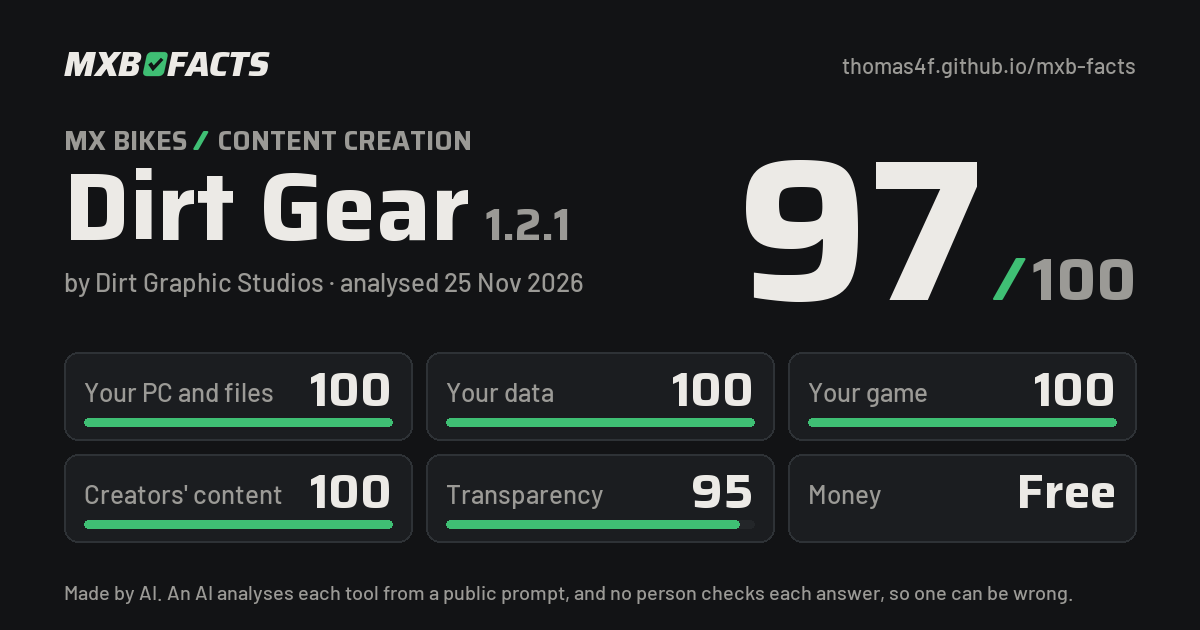 HTML
<a href="https://thomas4f.github.io/mxb-facts/dirt-gear/"><img src="https://thomas4f.github.io/mxb-facts/badge/dirt-gear/card.png" width="600" alt="MXB Facts card for Dirt Gear"></a>Markdown[](https://thomas4f.github.io/mxb-facts/dirt-gear/)BBCode (forums)[url=https://thomas4f.github.io/mxb-facts/dirt-gear/][img]https://thomas4f.github.io/mxb-facts/badge/dirt-gear/card.png[/img][/url]Discord and other chat apps: paste the address. The app shows the same card image under it.
Addresshttps://thomas4f.github.io/mxb-facts/dirt-gear/Badge: for a README. A badge shows a score without the release it belongs to, so each is pinned to one release (1.1.1) and links to its card; when you move it to a new release, it says "Not analysed yet" until that card is published, from when our weekly check has seen the release.
Badge styles, ready to copy
 Flat, Markdown
[](https://thomas4f.github.io/mxb-facts/dirt-gear/1.1.1/) Plastic, Markdown
[](https://thomas4f.github.io/mxb-facts/dirt-gear/1.1.1/) Flat square, Markdown
[](https://thomas4f.github.io/mxb-facts/dirt-gear/1.1.1/) For the badge, Markdown
[](https://thomas4f.github.io/mxb-facts/dirt-gear/1.1.1/) Score, Markdown
[](https://thomas4f.github.io/mxb-facts/dirt-gear/1.1.1/)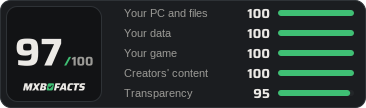 Areas, Markdown
[](https://thomas4f.github.io/mxb-facts/dirt-gear/1.1.1/)Or have shields.io draw it, in any of its styles (add
&style=and its options): the same score and colours, with shields.io's own text for the label.shields.io, Markdown[](https://thomas4f.github.io/mxb-facts/dirt-gear/1.1.1/)