mxbmrp3


An open-source plugin for MX Bikes, GP Bikes, and Kart Racing Pro with customizable on-screen displays, immersion features, social tools, and streaming/broadcasting overlays.
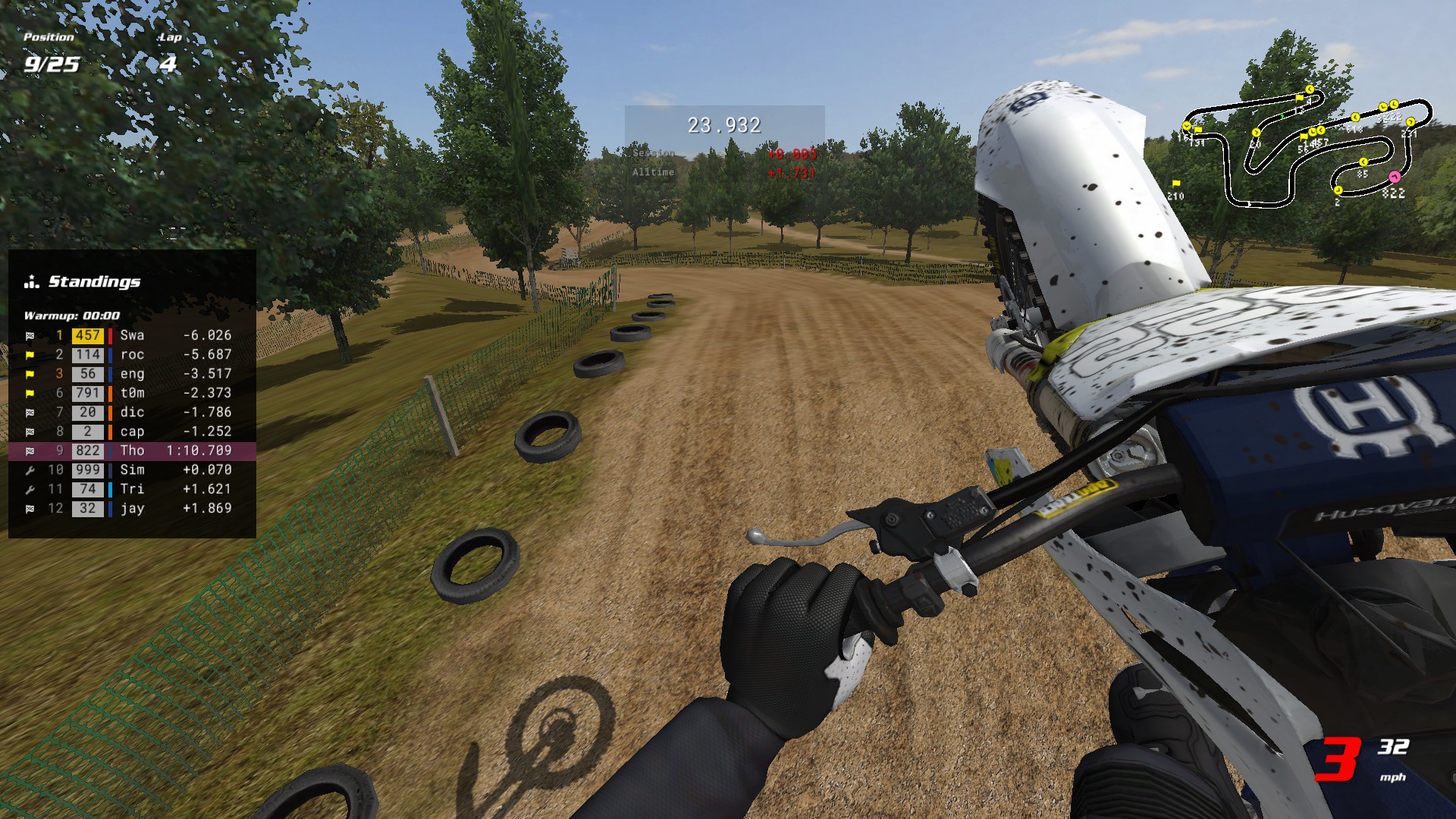 Default HUD layout. All elements are fully customizable - see Tips & Tricks for setup ideas.
Features
- Customizable HUD layouts with drag-and-drop positioning, hotkeys, themes, and auto-switching profiles
- Live race data covering standings, timing, gap-to-PB bar, track map, radar, event log, and online records
- Telemetry and lap analysis with splits, personal bests, race-progression charts, and fuel tracking
- Spotter voice calling riders around you, your gaps, flags and hazards, with subtitles and voice packs
- Social features including Steam friends, Discord Rich Presence, and rider tracking with colors/icons
- Broadcasting features with auto-director, OBS overlay, controller visualization, and companion window
- First-person helmet overlay with telemetry-driven tilt and vibration, plus controller rumble
- Achievements from Bronze to Platinum for riding, racing, freestyle, and exploring the plugin itself
- Persistent stats and personal bests across sessions, plus FMX freestyle trick scoring
- Moddable panel themes, textures, fonts, icons, web overlay styling, and INI-level configuration
Get Started


Quick Start
- Download the installer above and run it
- Launch the game and load a track
- Move the mouse to bring up the pointer, then right-click and drag to reposition elements
- Press Tilde (~) or click the settings button to toggle elements, adjust opacity, and more
The installer isn’t signed yet, so Windows will warn about an “unknown publisher” - why & how to proceed.
Contents
- Installation
- Controls
- Configuration
- HUDs & Widgets
- More Features
- Tips & Tricks
- Advanced Settings
- Modding
- Troubleshooting
- Privacy
- Feedback & Issues
- Uninstallation
- Development
- License
- Acknowledgments
- About
Installation
Requirements:
- MX Bikes beta21 or newer / GP Bikes beta22b or newer / Kart Racing Pro Release 14 or newer
Automatic Installation
- Download the latest installer
mxbmrp3-Setup.exe - Run the installer - it finds your MX Bikes, GP Bikes and Kart Racing Pro installations (Steam or standalone), lets you pick which to install for, puts the files in each one’s
plugins\folder, and keeps your settings on an upgrade
Manual Installation
- Download the latest release archive
mxbmrp3.zip - Find your game’s plugins folder:
- Steam: Right-click the game in your library > Manage > Browse local files > open
plugins - Standalone: Navigate to your game installation folder (e.g.,
C:\Program Files\[Game]\) > openplugins
- Steam: Right-click the game in your library > Manage > Browse local files > open
- Extract the plugin files:
- Copy the DLO for your game to the
plugins\folder:mxbmrp3.dlofor MX Bikesmxbmrp3_gpb.dlofor GP Bikesmxbmrp3_krp.dlofor Kart Racing Pro
- Copy the
mxbmrp3_data\folder to theplugins\folder
Do NOT delete the existing game files (
proxy64.dlo,proxy_udp64.dlo,xinput64.dli, ortelemetry64.dlofor GP Bikes) - these are native game files, not old plugin versions.Your directory should look like this after installation (files vary slightly by game):
[Game]/ │ mxbikes.exe / gpbikes.exe / kart.exe │ ... │ └───plugins/ ├── mxbmrp3_data/ ← Add this folder (from release) ├── mxbmrp3.dlo ← Add this (MX Bikes only) ├── mxbmrp3_gpb.dlo ← Add this (GP Bikes only) ├── mxbmrp3_krp.dlo ← Add this (Kart Racing Pro only) ├── proxy_udp64.dlo ← Keep (native game file) ├── proxy64.dlo ← Keep (native game file) ├── xinput64.dli ← Keep (native game file) └── telemetry64.dlo ← Keep (GP Bikes only) - Copy the DLO for your game to the
After Installation
Launch the game and load a track - a few elements are on by default, so the HUD appears right away. If nothing does, see Troubleshooting.
Controls
Mouse
- Move Mouse - Show mouse pointer and settings button (auto-hides after inactivity)
- Left Click - Interact with settings menu and HUD elements
- Right Click & Drag - Reposition elements
- Left Click a rider - On the Map, Standings, Event Log or Charts HUD, switch the spectate camera to that rider
Keyboard Shortcuts
Keyboard and controller hotkeys can be customized in Settings > Hotkeys. By default, only the settings menu hotkey is configured:
- Tilde (~) - Toggle settings menu. It is the key left of 1 on the number row, so on a non-US layout it may be marked ` or § rather than ~
Configuration
The plugin is active in-game only - it does nothing in the main menus, so all configuration happens on track.
Hover over any setting for a tooltip explaining what it does.
Auto-Save (Settings > General) writes your changes when you leave the track. To save sooner, use the Save button at the bottom of the menu - it lights up whenever you have unsaved changes.
The settings menu provides global settings that apply to all profiles, followed by per-element tabs for the individual HUDs and widgets:
| Icon | Tab | Description |
|---|---|---|
 |
General | Profiles, preferences, web overlay, presence integrations, usage survey |
 |
Appearance | Units, fonts, panel theme, colors, HUD placement, and which display it draws on |
 |
Hotkeys | Keyboard and controller bindings |
 |
Riders | Track specific riders with custom colors and icons |
 |
Rumble | Controller vibration feedback effects |
 |
Helmet | First-person helmet overlay configuration |
 |
Director | Auto-director for spectating and replays - automatically follows the most interesting rider |
 |
Spotter | Spoken race callouts and their subtitles - voice, categories, and proximity distances |
 |
Achievements | Tiered achievements for riding, racing and exploring the plugin, and their toasts (MX Bikes only) |
 |
Updates | Check for new versions and install updates in-game |
Plus a tab for each individual HUD, and one shared Widgets tab covering every widget.
Profiles
Four separate profiles store complete HUD layout configurations:
- Practice - Practice and warmup sessions
- Qualify - Pre-qualify, qualify practice, and qualify sessions
- Race - Race 1, Race 2, Straight Rhythm sessions
- Spectate - Spectating or viewing replays
Auto-Switch (Settings > General) changes profiles for you as the session type changes.
HUDs & Widgets
HUDs are the larger data displays - each gets its own settings tab with options like column/row toggles, gap modes, and textures. Widgets are simpler, single-purpose readouts (one number, gauge, or dial); rather than a tab each, they’re configured together under the shared Widgets tab, a row apiece for visibility, title, texture, opacity and scale (the two that belong to a feature - the Director’s status button and the Spotter’s subtitles - sit on that feature’s own tab instead). A few carry further options in the INI (the Lean widget’s arc and markers, for one).
HUDs
| Icon | HUD | Description |
|---|---|---|
 |
Standings | Live race positions with gaps, status, and tracked rider indicators |
 |
Map | Top-down track map with rider positions (click to spectate) |
 |
Radar | Proximity radar with approach alerts and distance arrows |
 |
Lap Log | Historical lap times with PB indicators |
 |
Ideal Lap | Best sector times and theoretical ideal lap |
 |
Charts | Session-progression charts: position, race trace, gap to leader, pace |
 |
Telemetry | Throttle, brake, suspension graphs |
 |
Records | Online lap records (CBR or MXB-Ranked) with personal bests (MX Bikes only) |
 |
Pitboard | Pitboard-style lap information display |
 |
Session | Session info (type, track, format, server, weather) |
 |
Timing | Split and lap times with gap comparisons |
 |
Gap Bar | Visual gap-to-PB bar with position markers |
 |
Notices | Race status notices (wrong way, blue flag, PB alerts, last lap, finished) |
 |
Event Log | Timestamped feed of race events (laps, penalties, finishes, pit activity) |
 |
Friends | Steam friends in-game: their server/track and who’s joined your session |
 |
FMX | Freestyle trick detection with scoring and chain combos (MX Bikes and GP Bikes only) |
 |
Stats | Riding stats with columns for last lap, session, and all-time totals |
 |
Performance | FPS and the plugin’s own per-frame time |
Widgets
| Widget | Description |
|---|---|
| Position | Race position |
| Lap | Current lap number |
| Time | Session time/countdown |
| Clock | Real-time clock |
| Gear | Current gear |
| Speed | Current speed |
| Crashes | Resettable crash tally |
| Bars | Vertical telemetry bars (throttle, brake, suspension, etc.) |
| Lean | Bike lean angle with arc gauge |
| G-Force | Lateral/longitudinal G-force gauge with peak marker |
| Fuel | Fuel calculator with consumption tracking |
| Tyre Temp | Front and rear tyre temperatures (GP Bikes only) |
| ECU | Engine map, traction control, engine braking and anti-wheeling (GP Bikes only) |
| Speedo | Analog speedometer with odometer and trip meter |
| Tacho | Analog tachometer |
| Compass | Heading dial (classic needle or modern rotating card) |
| Gamepad | Controller visualization |
| Pointer | The mouse cursor. Off = settings menu only, which helps if a pad reads as a mouse |
| Settings | The button that opens this menu. Hide it if you prefer the Tilde hotkey |
| Version | The plugin’s version number |
| Prestige | A badge earned by trading in a completed achievement ladder (MX Bikes only) |
More Features
Each of these has its own switch in the settings menu.
Web Overlay
Turn on Web Server (Settings > General) and the plugin serves a live browser overlay: a standings tower, event log, rider focus card, and periodic broadcast panels (fastest-lap boards, a “down the order” rundown, and on-track battles). Point an OBS Browser Source at http://localhost:8080 (the port is shown beside the setting), or just open it in a browser. Colors and fonts follow your in-game settings, and a gear icon on the overlay sets tower size, filters and the rest per browser. Full guide: Web overlay.
Achievements (MX Bikes only)
Settings > Achievements: a hundred-odd milestones, Bronze to Platinum, for riding, racing, freestyle, jumping and for trying out the plugin itself. A toast marks each tier earned, and a halfway card the long steps to Gold and Platinum (Show toasts turns the cards off; tracking continues either way). They read your existing stats, so an install starts with whatever its numbers already earn. A few are hidden until you stumble on them, and the ones about things going wrong have their own page, outside the completion figures.
Take every counted one to Platinum and a Prestige button appears, trading the whole ladder back - achievements and their counters to zero - for a level and the Prestige badge widget. Personal bests are untouched; there is no way back, so it asks twice. Full list: Achievements.
Spotter (voice callouts)
Turn on Spoken audio (Settings > Spotter, or the checkbox beside the tab) and the plugin talks to you while you ride: riders behind or alongside you, blue flags, a rider down, and - each time you cross the line - your position and the gaps ahead and behind. Windows text-to-speech reads it out of the box, with TTS voice, Speed and Volume to choose how; recorded voice packs are a separate download. Five Callouts switches decide what gets announced, and Subtitles puts every call on screen so you can run it silent. It follows whoever you’re watching, so it works while spectating and in replays. Full guide: Spotter voice.
Auto-director (spectating & replays)
Turn on the Director (Settings > Director, or its camera-icon status button) and it automatically cuts the spectate camera to the most interesting rider or battle, broadcast-style, so you don’t have to switch riders by hand. It works while spectating live and in replays - a great way to re-watch or record a session and let it direct the action for you. It also drives the Web Overlay’s battle panel.
Second-monitor HUD (Companion window)
Set HUD Display (Settings > Appearance) to Companion or Both to open a standalone window you can drag and maximize on a second monitor. Each HUD keeps its own on/off state and position there (drag or toggle it while your mouse is over that window), so you can run a minimal in-game layout and a full dashboard on the second screen at once.
Track records
The Records HUD fetches online lap records from CBR or MXB-Ranked. Turn on Auto-fetch (Settings > Records) to load them when you enter a track. Records also work while spectating.
Custom segment timing (training tool)
Bind the Segment Add and Segment Remove hotkeys (Settings > Hotkeys) to drop timing points on the track as you ride. Drop two and the Timing HUD times the section between them - live, with a delta to your best for it - so you can drill a single corner or rhythm section without completing a full lap. Remove the points to return to normal split/lap timing.
See where friends are racing
Steam Friends (Settings > General) is on by default on the Steam build. It broadcasts your session to friends and populates the Friends HUD: which of your Steam friends are in-game, the server and track they’re on, and who’s joined your session.
Tips & Tricks
Streaming setup
Turn on the Session HUD (Settings > Session) to show the server name, track, and session format on screen for your viewers. The Pitboard and Gamepad widgets also work well on stream - both have fully customizable textures, and the Gamepad widget shows your live controller inputs. Pair with Discord Rich Presence (Settings > General) to show your current session and track in your Discord profile. For a broadcast-style overlay, see Web Overlay.
Power-user INI tweaks
More options are available by editing the INI file directly. It is organized by HUD section, and each section takes per-element color and font overrides. Colors use ABGR hex values; fonts use the font filename (without .fnt) of any file in the fonts/ folder. For example:
[StandingsHud]
classicLayout=1            ; remove number plates and brand color strips

[SpeedWidget]
color_primary=0xff00ff00   ; green text (ABGR format)
font_title=RobotoMono-Bold ; Roboto Mono Bold font
Use the Color Override Picker to convert RGB colors to ABGR format. See Advanced Settings for how to edit and hot-reload the INI file.
Getting the most FPS
Biggest wins first:
- Turn on Direct GL Rendering (Settings > General) - the plugin draws the HUD itself instead of handing every piece of it to the game
- Set Panel Theme to None (Settings > Appearance) - a theme puts artwork behind every panel
- Turn off Drop Shadow (Settings > Appearance) - every shadowed string is drawn twice
- Turn down Detail, and slim or turn off Track outline (Settings > Map) - the track ribbon is the plugin’s largest single piece of drawing
- Turn off what you don’t use (the checkbox beside each tab, or the Visible column in Settings > Widgets) - a hidden element builds and draws nothing
Beyond the plugin: every other plugin in your plugins folder works every frame whether you use it or not, so removing ones you don’t need is often the biggest win of all.
Experimental: run the plugin on its own thread
By default the plugin does its work during the game’s frame. Set pluginThread=1 in the [Advanced] section of the INI file to move the plugin’s HUD building and event handling onto a separate thread, so a heavy HUD rebuild can’t cost you frames. It’s experimental - try it if you’re chasing the smoothest possible frame times. Toggle it live with the Reload Config hotkey.
Game settings that pair with the plugin
These three are the game’s own settings, not the plugin’s.
Remove the stock pitboard
Create an empty file called pitboard.cfg in [Game]\misc\hud\ (create the directories if needed). This removes the default 2D pitboard while keeping the small 3D pitboard in the game world. Delete the file to restore it.
Show/hide the rider stand icon
Turn on Show Rider Stand (Simulation). To customize the icon or its position, extract rider.cfg and riderstand.tga from misc.pkz\misc\helpers\ to [Game]\misc\helpers\ and edit them there.
Show/hide the game’s native gear indicator
Turn off Show HUD (Simulation) if you’d rather use the plugin’s Gear widget instead. To customize the graphics or position, extract gear.tga, hud.cfg, LCD.fnt, and switch.tga from misc.pkz\misc\hud\ to [Game]\misc\hud\ and edit them there.
Advanced Settings
All plugin settings are stored in mxbmrp3_settings.ini in your user data folder.
Most settings are in the in-game menu; the power-user ones are INI-only, and carry inline comments there.
INI structure:
[HudName]- Base/default settings for a HUD[HudName:Practice],[HudName:Qualify],[HudName:Race],[HudName:Spectate]- Profile-specific overrides (only values that differ from base)
Editing the INI file:
With the game closed (recommended):
- Exit the game completely
- Edit
mxbmrp3_settings.ini - Launch the game to apply changes
Hot reload (for rapid iteration):
- Turn off Auto-Save (Settings > General)
- Edit the INI file while the game is running
- Use the Reload Config hotkey to apply changes (bind it in Settings > Hotkeys)
If Auto-Save is enabled, your in-game state is written back when you leave the track, overwriting any manual edits you made to the INI during that session - so disable Auto-Save first for hot reload.
Modding
Put your files in Documents\PiBoSo\[Game]\mxbmrp3\, never in the install folder ([Game]\plugins\mxbmrp3_data\): bundled files there are overwritten on update, while anything in Documents survives it. The web overlay’s custom.css goes there too - you create that one yourself.
Fonts, textures and icons are loose files in their own subfolders. Themes, gamepad packs, pit boards, gauges and spotter voices are packs - a folder holding that pack’s art or audio plus a <type>.ini describing it (theme.ini, gamepad.ini, pitboard.ini, gauge.ini, spotter.ini - a fixed name, so copying a pack and renaming the folder is the whole job). Every pack’s ini opens with the same [pack] section, and base = <pack> layers yours over a shipped one so a reskin is one or two files. Both kinds sync to the plugin on startup, and your choice is stored by folder name, so adding or removing other packs never reassigns it.
- Modding guide - the folder layout, panel themes, textures, gamepad, pit board and gauges packs, fonts, icons, and the web overlay’s HTML/CSS/JS.
- Spotter voice - what it calls, how to set it up, and how to reword it or record your own voice.
- Web overlay - the OBS browser source, the overlay’s own settings panel, and where they are saved.
- FMX tricks - every trick the FMX HUD recognises, what it takes, what it is worth, and how a chain multiplies.
Data Files
| File | Description |
|---|---|
mxbmrp3_settings.ini |
All HUD settings (positions, visibility, options) |
mxbmrp3_tracked_riders.json |
Tracked riders with colors and icons |
mxbmrp3_rumble_profiles.json |
Per-bike rumble effect profiles |
mxbmrp3_stats.json |
Unified stats, personal bests, odometer data, and earned achievements |
mxbmrp3_analytics.json |
Anonymous random install ID for the usage survey (see Privacy) |
mxbmrp3_log.txt |
The plugin’s log for the current session - worth attaching to a bug report |
Troubleshooting
Windows Warns Me When Downloading or Installing
The installer isn’t code-signed yet, so Windows may show one or more “unknown publisher” / “not commonly downloaded” warnings. These are reputation warnings about the unsigned installer and its low download count, not a malware detection. Depending on your browser you may see up to three, in this order:
- Downloading (browser): “isn’t commonly downloaded.” In Microsoft Edge: open Downloads, click the
...next to the file, then Keep > Show more > Keep anyway (Chrome is similar). - Running the installer (Windows SmartScreen): a blue “Windows protected your PC” box - click More info > Run anyway.
- Installing (User Account Control): “…app from an unknown publisher…“ - click Yes. Admin is required because the plugin is copied into the game’s
plugins\folder underProgram Files.
Installing manually from the ZIP archive avoids most of these, since there’s no installer to run. If you’d like to check the download anyway, you can scan it on VirusTotal.
The long-term fix is a code-signing certificate (a paid yearly cost, and one of the things donations would go toward). Until that’s in place, the steps above are all that’s needed.
Make Sure You’re on the Latest Version
- Many issues are already fixed in a newer release, so update before troubleshooting further
- Check your version in Settings > Updates (or the Version widget) and install a newer one from there - no manual download or reinstall needed. The plugin also notifies you on startup when a stable release is out
- If the in-game updater is set to Off or unavailable, download the latest release manually from GitHub Releases and reinstall
HUD Not Appearing
- Check the Installation requirements for your game’s minimum version
- Verify the DLO file and
mxbmrp3_data\are in the correctplugins\folder. Games have two directories - the game installation (contains the game .exe) and user data (Documents\PiBoSo\[Game]\). Plugins go in the game installation, not Documents. - Use the correct DLO for your game:
mxbmrp3.dlo(MX Bikes),mxbmrp3_gpb.dlo(GP Bikes), ormxbmrp3_krp.dlo(Kart Racing Pro)
Installer Detected the Wrong Game Directory
- If you have multiple installations (e.g., standalone and Steam), the installer may pick the wrong one. Verify the plugin ended up in the
plugins\folder next to the game.exeyou actually launch. If not, run the installer again and select the correct path, or install manually.
Text or Icons Not Appearing
mxbmrp3_data\holds the fonts, textures and icons, and must sit inplugins\beside the DLO (see directory structure)- If you moved or renamed it, restore it from the release archive
Gamepad Widget Appears Cut Off
- Click Reset Widgets (Settings > Widgets) to correct the button positions
Elements Appearing Twice (Ghost/Duplicate)
- Check for duplicate MXBMRP3 DLO files - only one of
mxbmrp3.dlo(MX Bikes),mxbmrp3_gpb.dlo(GP Bikes), ormxbmrp3_krp.dlo(Kart Racing Pro) should exist in your plugins folder. Other plugins’ DLO files are fine.
Elements Overlapping
- Drag elements to reposition them
- Use the settings menu to adjust scale
Controller or Rumble Not Working
- Verify the correct Controller is selected (Settings > General)
- If you accidentally deleted
xinput64.dlifrom the plugins folder, controller input may stop working - To restore: verify game files integrity (Steam) or reinstall the game
Web Overlay Not Working
- If Web Server reads Error (Settings > General), the plugin couldn’t open the port - usually because another application already has it
- Change Web Server Port (Settings > General) to a free one (e.g., 8081). When it’s serving, the row below turns into a clickable
http://localhost:<port>link - Remember to update your OBS Browser Source URL to match the new port
Game Fails to Launch, Crashes, or Shows Black Screen
- See the MX Bikes Troubleshooting Guide for general game issues (crashes, mods, plugins, RAM, controllers)
- If the Windows Event Log shows
mxbmrp3.dloas the faulting module, see Feedback & Issues
Privacy
The plugin sends a small anonymous ping per game launch, so the developer can see how many people use it, which features are worth keeping, and what needs fixing. It is on by default. The installer asks before anything is sent: untick Participate in the anonymous usage survey on its Privacy page and the plugin starts with it off. You can change it at any time with the Usage survey toggle (Settings > General). Turning it off sends one final anonymous opt-out ping, then nothing more.
Turning it off doesn’t disable anything else; the plugin works exactly the same. The one difference: the plugin catches crashes in the game itself, which is what the known-crash list is built from, and with the usage survey off yours stop being reported automatically. The crash files are still written to Documents\PiBoSo\[Game]\mxbmrp3\crashes\, so you can still attach them to a bug report.
What it sends:
| Data | Details |
|---|---|
| Install ID | A random UUID made on your machine (stored in mxbmrp3_analytics.json), not tied to your name, account, hardware, or IP. Delete the file to reset it. |
| Version & game | The plugin version and game, and whether this launch is a fresh install or an upgrade |
| Enabled features | HUDs, widgets, web overlay, Discord, Steam, rumble, update channel, and so on, as anonymous on/off flags |
| Panel theme | Which of the plugin’s own themes you use, or that you run with none. A theme you installed or made yourself counts only as “custom” - its name never leaves your machine |
| Spotter voice | Which of the plugin’s own voice packs you use, that you use Windows text-to-speech instead, or that the spotter is off. A pack you installed or made yourself counts only as “custom” - its name never leaves your machine |
| Environment | Operating system and version/build (e.g., Windows 11 22631, or Wine/Proton on Linux), language, and whether it’s the Steam or standalone build |
| Usage counters | How many times this install has launched, and how many days since it was first installed |
| Achievement progress | Which achievements are unlocked and at what tier, plus two totals: the share of tiers earned, and how many are unlocked |
| Session length | How long a play session lasted (start to clean exit), so the developer can gauge typical usage |
| Crashes | If the game crashed last session: which module faulted and where, the error code and access type (read/write/execute), the plugin and game versions at the time, and a short backtrace of the faulting call stack (the top several module-and-offset frames, so a plugin fault can be told apart from a bystander to a game or driver crash) - enough to group similar crashes, but never the memory dump or its contents. Reported on the next launch |
| Link clicks | Which in-plugin link you click (docs, community, or support/donate) - nothing else |
| Prestige | That you traded a finished achievement ladder for a prestige level, and which level it reached |
What it does not send: no names, no in-game/online activity, no telemetry, no lap times, no server or rider data, and no crash dump or log (those stay on your machine) - nothing identifying. The pings are fire-and-forget and never affect performance.
Usage-survey data is processed by two open-source services: Aptabase handles the detailed events above, and GoatCounter receives a single per-launch hit as an aggregate headcount. Both are covered by the one Usage survey toggle.
When the usage survey is on, the plugin may also fetch a small config file from this repository that can only ever reduce what’s sent, never add to it. Turning the Usage survey toggle off stops this too.
What the data actually adds up to: the aggregate results are published in usage_survey/REPORT.md - installs, activity over time per game, version adoption, geography, feature/HUD popularity, and crash trends (grouped by which module faulted). It’s generated straight from the anonymous pings described above, so you can see exactly what they amount to.
Feedback & Issues
Bug reports, feature requests, and questions are all welcome. Open an issue on GitHub or leave a comment on MXB-Mods.
A short description of what you were doing when the issue happened (track, session type, bike, and any reproduction steps) helps a lot.
For crashes, attach the matching pair - same timestamp and pid - written to Documents\PiBoSo\[Game]\mxbmrp3\crashes\ whenever the plugin catches an unhandled fault:
mxbmrp3_crash_<timestamp>_<pid>.dmp- the minidump (state at the moment of crash)mxbmrp3_crash_<timestamp>_<pid>.log- a snapshot of the plugin log captured at crash time
The plugin catches any crash in the game, so these are usually faults in the game itself rather than plugin bugs. Check Known MX Bikes Crashes first - it lists the game-engine crashes the handler has caught, with Event Viewer fault offsets you can match against yours. A crash listed there is a known game bug with no plugin fix possible.
Uninstallation
Automatic Uninstallation
If you used the installer, remove the plugin like any other Windows app: open Settings > Apps > Installed apps (or Control Panel > Programs and Features), find MXBMRP3, and choose Uninstall. You can also run mxbmrp3_uninstall.exe directly from any game’s plugins\ folder. The uninstaller lets you pick which games to remove from, then deletes the plugin DLO, the mxbmrp3_data\ folder, and the registry entry.
Manual Uninstallation
If you installed from the ZIP, delete the files you added from each game’s plugins\ folder:
- the plugin DLO (
mxbmrp3.dlo,mxbmrp3_gpb.dlo, ormxbmrp3_krp.dlo) - the
mxbmrp3_data\folder
Leave the game’s own files in place - proxy64.dlo, proxy_udp64.dlo, xinput64.dli, and telemetry64.dlo (GP Bikes). They are not part of the plugin.
Settings & Data
Both methods leave your settings, profiles, and stats untouched, so an upgrade or reinstall keeps them. To remove them as well, delete the per-game folder:
Documents\PiBoSo\[Game]\mxbmrp3\
Development
Built with C++17, Visual Studio 2022, the PiBoSo Plugin API, and Claude Code.
DEVELOPMENT.md- building (Windows shipping build + Linux cross-build) and running the test suitesCONTRIBUTING.md- how to report bugs and contribute changes (and how the public mirror works)TESTING.md- the layered test suite (unit / integration / specialized) and how to add a testARCHITECTURE.md- full technical documentation with diagramsCLAUDE.md- quick-start context for developers and AI assistants
Quick start: clone, run cmake --preset msvc, then open the generated build/msvc/mxbmrp3.sln in Visual Studio 2022 and build. The full configuration table, the Linux cross-build, and the unit/integration tests are documented in DEVELOPMENT.md.
License
Licensed under the MIT License. See THIRD_PARTY_LICENSES.md for bundled asset attributions.
Acknowledgments
- bh5o - Pitboard texture
- Husk - Gamepad widget source design files
- HornetMaX - MaxHUD, which served the MX Bikes community for over a decade
Thanks to everyone in the MX Bikes community who tested, reported bugs, and shared ideas.
About
MXBMRP3 is a free, open-source community project developed by one person in their spare time.
It started in 2024 with MXBMRP - MX Bikes Memory Reader Project, a small experiment I built before I really knew what I was doing. That grew through several versions into MXBMRP3, a full plugin built on the game’s plugin API.
The project was created after development of MaxHUD, the community’s long-standing HUD, came to an end. MXBMRP3 has since grown through community suggestions, testing, bug reports, and experimentation.
There is no company or development team behind it. I develop and fund it in my spare time, but much of what it has become comes from the people who use it - the riders who report problems, suggest features, test new ideas, and keep finding new ways to use it.
Keeping MXBMRP3 open source is deliberate. It means the project can be studied, contributed to, adapted, and built upon rather than disappearing with the person who made it.
If you’d like to chip in toward continued development, you can do so here:


No perks, no priority, no expectations. Just appreciated.
If MXBMRP3 makes the game a little better for you, or inspires something new, then it has done what I hoped it would.